 Panelize
Panelize › ChatGPT vs Claude vs Gemini
ChatGPT vs Claude vs Gemini: how to compare them on your own prompts
Benchmarks and reviews go stale every time a model updates, and they rarely test the kind of work you do. The most reliable way to pick between ChatGPT, Claude and Gemini is to give all three the same prompt and read the answers side by side.
Why "which AI is best" has no single answer
- Models change constantly. All three providers ship new versions several times a year, so last quarter's ranking may already be wrong.
- Strengths depend on the task. One model may write better marketing copy while another is more careful with code or facts.
- Plans differ. The free tier and the paid tier of the same product can use different models and limits.
So instead of asking which AI is best in general, ask which one is best for your prompts, today.
A fair side-by-side test in five steps
- Use the same prompt, word for word. Small wording changes can change the answer more than the model does.
- Start fresh chats. Earlier messages, memory and custom instructions all influence the output. A temporary or incognito chat keeps the test clean.
- Compare like with like. Free tier against free tier, or each provider's top paid model against the others. Note which model is selected in each one.
- Run each prompt two or three times. Answers vary between runs. A model that is right once and wrong twice is not reliable.
- Score with a checklist (below), not by which answer sounds most confident.
Test prompts by use case
Use your own real tasks when you can. These are good starting points:
Writing
Rewrite this paragraph for a busy executive: keep it under 80 words, keep every number, and end with one clear ask. [paste paragraph]
Coding
Here is a function and the error it throws. Explain the root cause in two sentences, then give the smallest fix. [paste code and error]
Research and fact-checking
What are the main arguments for and against [topic]? Mark any claim you are unsure about, and say what source would confirm it.
Reasoning
Pens are sold only in packs of 3 for $2. Notebooks cost $1.75 each. I have $20 and need at least 4 notebooks. What is the largest number of pens I can buy? Show your working.
Summarizing
Summarize this document in five bullet points for someone who has not read it, then list anything important the summary leaves out. [paste text]
Scoring checklist
| Check | What to look for |
|---|---|
| Correct | Facts, numbers and code are right. Verify anything you cannot check at a glance. |
| Follows instructions | Respects length, format and constraints you set. |
| Specific | Gives concrete details instead of generic advice. |
| Honest about uncertainty | Flags what it doesn't know instead of inventing sources or APIs. |
| Useful as-is | How much editing would you need before using the answer? |
Where the three answers agree, you can be more confident. Where they disagree, that is exactly the part to verify yourself.
Running the comparison with Panelize
Doing this by hand means copying the same prompt into three tabs and flipping between them. Panelize is a free Chrome extension that puts the real ChatGPT, Claude and Gemini websites next to each other and sends one prompt to all of them.
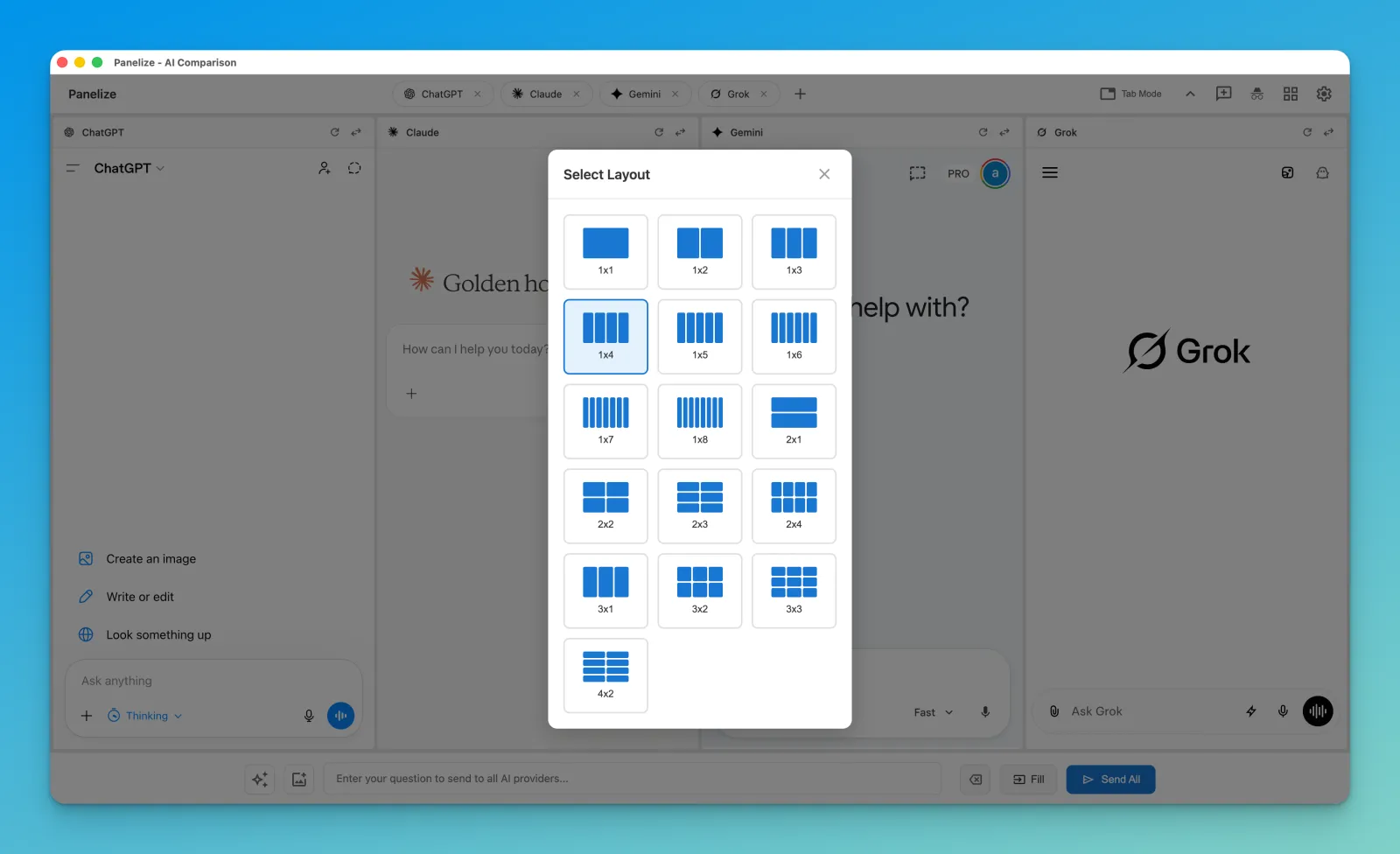
- Press Cmd/Ctrl + Shift + E and choose the 1×3 layout with ChatGPT, Claude and Gemini.
- Click Temporary Chat for All so memory and history don't affect the test.
- Paste your prompt. Use Fill to check it in every panel, then Send All.
- Between prompts, click New Chat for All to reset every panel at once.
- Save your test prompts in the Prompt Library with variables such as
{topic}so you can rerun the same set when a new model comes out.
Panelize uses the accounts you are already logged into, so each panel runs on your own free or paid plan. Want more opinions? Add Grok, DeepSeek or Kimi as extra panels.
Free, open source, no API keys.
Add Panelize to Chrome